Enemy AI and EQS
Behavior Tree based modular AI architecture, perception system, Blackboard-driven decision making, and EQS environment queries
This chapter explains the three-layer decoupled architecture of the enemy AI system, covering perception, logic, and presentation. It then uses melee enemies as a complete case study, tracing the full flow from perception trigger to Behavior Tree decision-making and attack execution.
6.1 Enemy AI Architecture: Modular Decoupling Between Controller and Base Class
Section titled “6.1 Enemy AI Architecture: Modular Decoupling Between Controller and Base Class”When building a dynamic and extensible AI system, separating logic from presentation is central to production-oriented development. This project uses Unreal Engine’s classic Controller - Pawn/Character architecture: the Controller owns decision-making, while the Pawn/Character carries state and executes presentation, decoupling enemy AI logic.
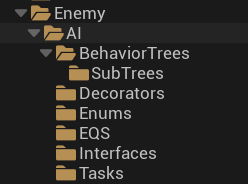
| Layer | Asset | Responsibility |
|---|---|---|
| Core base classes | BP_Enemy_Base / AIC_Enemy_Base | Baseline enemy framework |
| Logic layer | BT_Enemy_Melee + 3 subtrees (Frozen / Investigating / Passive) | Hierarchical decision management |
| Utility layer | Tasks (BTT) · Decorators (BTD) · EQS | Reusable Behavior Tree sub-behavior blocks |
Overall architecture: decoupled perception / logic / presentation layers
| Layer | Carrier | Responsibility |
|---|---|---|
| Perception layer | AIC_Enemy_Base | Mounts AI Perception for sight, hearing, and damage; starts the Behavior Tree; initializes the Blackboard |
| Logic layer | Behavior Tree & Blackboard | Blackboard stores memory such as AttackTarget and State; Behavior Tree decides behavior based on state variables |
| Presentation layer | BP_Enemy_Base | Stores attributes and resources, implements the BPI_EnemyAI interface, and executes action commands |
6.2 Melee Enemy Example: Full AI Flow Implementation
Section titled “6.2 Melee Enemy Example: Full AI Flow Implementation”Complete enemy AI data flow:
perception stimulus → AIC_Enemy_Base (Perception) → update Blackboard (AttackTarget / State) → BT_Enemy_Melee (decision) → BTT/BTD (execution) → BP_Enemy_Melee (presentation)
6.2.1 Assets and Presentation Layer: Enemy Pawn Class and Resource Carrier (BP_Enemy_Base / Melee)
Section titled “6.2.1 Assets and Presentation Layer: Enemy Pawn Class and Resource Carrier (BP_Enemy_Base / Melee)”In the decoupled AI architecture, the Pawn class, or character Blueprint, is the execution carrier for the AI. It does not make decisions. Instead, it acts as the carrier for resources and attributes, executes commands from the logic layer, and stores the resources and logic needed for presentation.
BP_Enemy_Base establishes the foundation for all enemies. It defines what an enemy is and which baseline shared capabilities enemies should have:
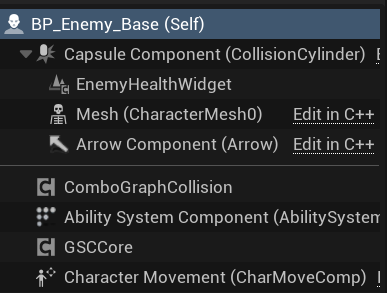
- Core components: GAS core, ensuring enemies share the same combat logic foundation as the player and use the same Attribute Set DataTable; UI and feedback, with
WB_EnemyHealthBarpresenting health in real time; and ComboGraphCollision for attack collision validation during combat. - Interfaces: implements the
BPI_EnemyAIBlueprint Interface, declaring to the AI Controller that it can receive commands such as equipping weapons, setting movement speed, and activating ComboGraph. This enables low-coupling interface communication. - Variable configuration: reserves variables for
PatrolRoute, referencingBP_PatrolRoute, andBehaviorTree, referencing the Behavior Tree asset. This allows each enemy instance placed in the level editor to configure its own patrol route and behavior logic.
BP_Enemy_Melee, as a child class of BP_Enemy_Base, is responsible for filling in melee-enemy-specific assets and visual presentation logic:
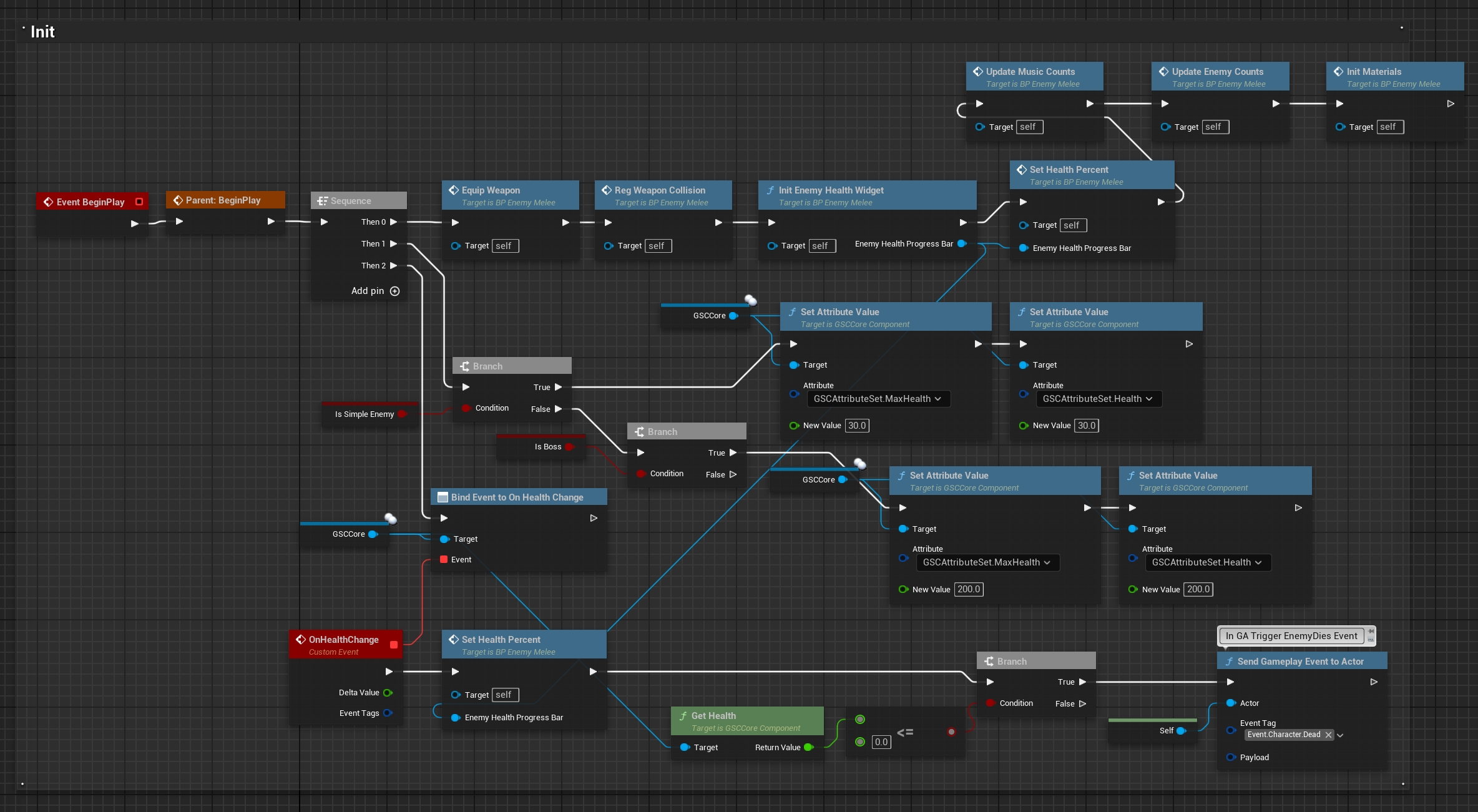
- Initialization flow: in BeginPlay, it performs weapon attachment, binding
BP_EnemyWeapon_DualSwordto the hand Socket; sets up ComboGraphCollision; creates the health bar Widget; and calculates gameplay drop probabilities. - Visual presentation layer: adds a dynamic dissolve death effect, driven by a dynamic material instance
DynamicEnemyDissolveMat; and random material selection on spawn throughSetSwordMaterial, selecting from a preset material array. This adds low-cost visual variety and enriches presentation.
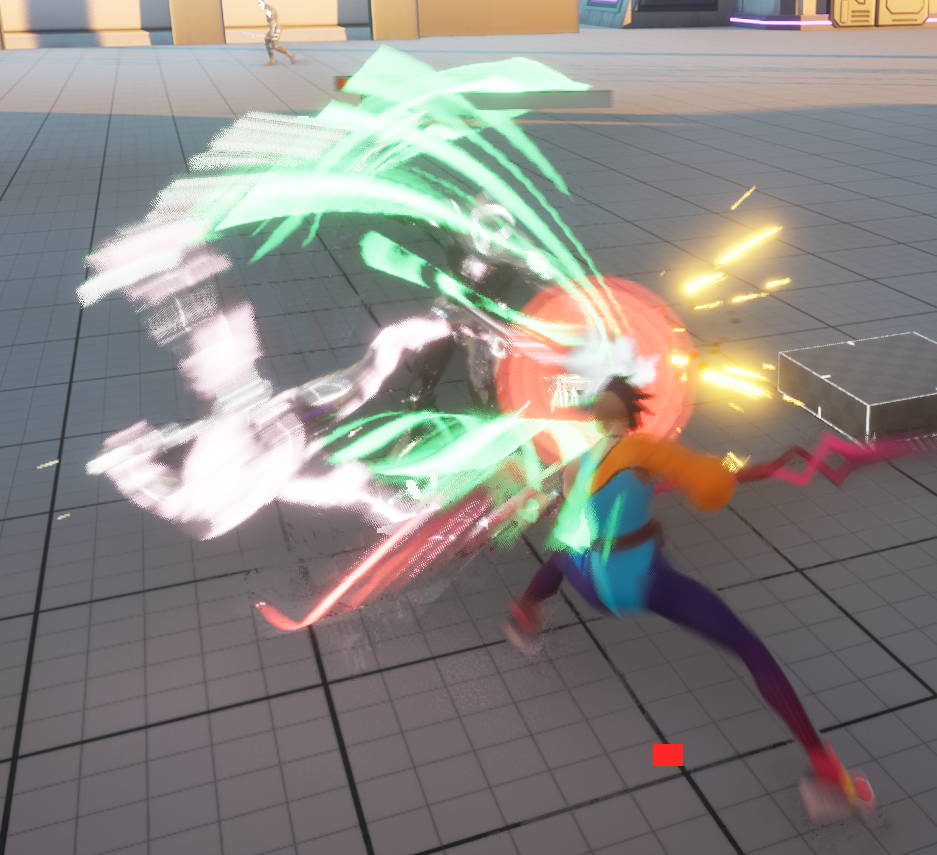
- Combat state management: declares combat-state variables, including whether the enemy has entered combat for one-shot logic such as drawing weapons, and a special logic switch for Boss behavior.
6.2.2 Perception Layer: Perception-Driven External Information Acquisition (AIC_Enemy_Base)
Section titled “6.2.2 Perception Layer: Perception-Driven External Information Acquisition (AIC_Enemy_Base)”AIC_Enemy_Base is the controller base class for all enemy AI. As the decision entry point of the AI system, it has two core responsibilities: environment perception and behavior startup.
AI Perception Component configuration:
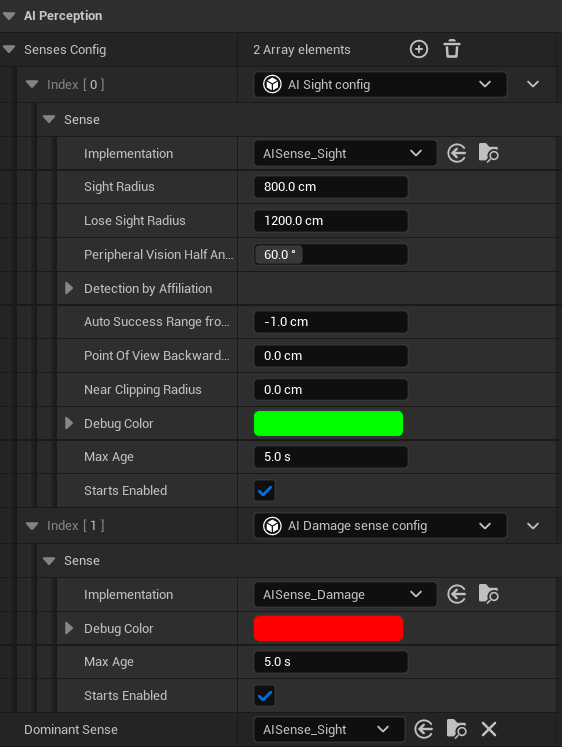
The controller mounts an AI Perception Component and configures three sense types to cover different combat scenarios:
- AI Sight: detects players within the field of view. It configures perception radius, field-of-view angle, and memory duration after line of sight is lost. This is the main trigger for enemies to transition from Passive to Attacking.
- AI Hearing: detects sound stimuli generated by the player, such as attack sounds or footsteps. If the enemy has not seen the player but hears a sound, it enters Investigating and moves toward the sound source.
- AI Damage: detects damage events from the player. Even if the enemy is facing away, taking damage immediately reveals the threat source and switches the enemy into combat, ensuring that a sneak attack does not leave the enemy unresponsive.
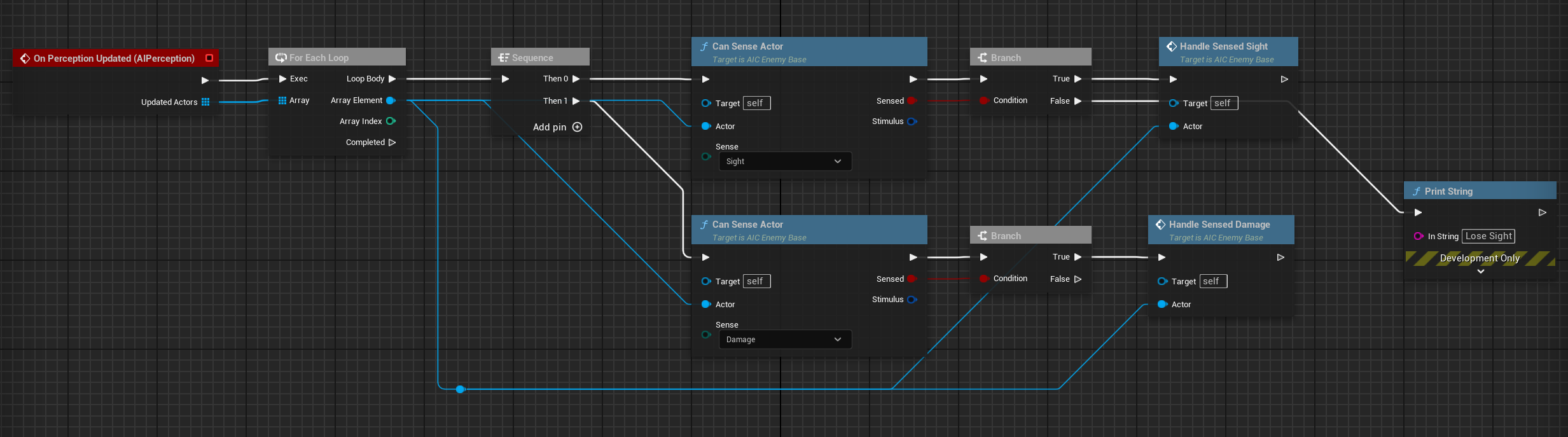
Perception event handling — On Target Perception Updated:
When any perception channel detects a stimulus source, the system triggers the On Target Perception Updated callback. The callback performs the following logic:
-
Sense type classification: uses the
E_AISensesenum, including None, Sight, and Damage, to identify the trigger source and determine the subsequent state-transition strategy. -
Blackboard variable update: writes the perceived target Actor into the Blackboard variable
AttackTarget, and updatesPointOfInterest, the movement target for Investigating, based on the sense type. -
AI state transition: updates the
E_AIStatesstate variable in the Blackboard according to the sense type:- Sight: sets the state directly to
Attacking, causing the enemy to enter combat immediately. - Damage: sets the state to
Attackingand assigns the damage source asAttackTarget. - Hearing: sets the state to
Investigating, causing the enemy to move toward the sound source. - Perception lost (Unregister): when the target leaves perception range, the system decides based on context whether to enter
Investigating, moving toward the last known location, or return toPassive.
- Sight: sets the state directly to
Behavior Tree startup and Blackboard initialization:
In the On Possess event of AIC_Enemy_Base, which is the moment when the Controller takes over the Pawn, the following initialization flow runs:
- Reads the preconfigured BehaviorTree asset reference from
BP_Enemy_Base, then calls Run Behavior Tree to start the Behavior Tree. - Initializes key variables in
BB_Enemy_Base, includingState, initially Passive;AttackTarget, initially empty;DefendRadius, the ideal attack distance; andPatrolRoute, read from the Pawn’s configured patrol-route reference.
6.2.3 Decision Layer: Decision Hub and Runtime Memory (BT_Enemy_Melee & BB_Enemy_Base)
Section titled “6.2.3 Decision Layer: Decision Hub and Runtime Memory (BT_Enemy_Melee & BB_Enemy_Base)”Blackboard BB_Enemy_Base — memory and shared data:
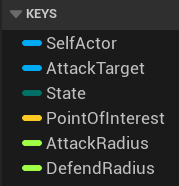
The Blackboard is the Behavior Tree’s short-term memory. It stores all key data the AI needs to read and write at runtime. Core Blackboard variables in this project include:
| Variable | Type | Purpose |
|---|---|---|
State | E_AIStates (Enum) | Current AI state, driving top-level Behavior Tree branch selection |
AttackTarget | Object (Actor) | Current locked attack target, usually the player |
PointOfInterest | Vector | Point of interest, used for investigation targets or EQS query results |
DefendRadius | Float | Ideal attack distance, used to determine whether the enemy should approach the target |
PatrolRoute | Object | Patrol route reference linked to BP_PatrolRoute |
E_AIStates enum: defines five enemy behavior states: Passive for patrol, Attacking for combat, BeingHit for hit stun, Investigating for searching, and Dead for death. This enum is the foundation of branch selection across the entire Behavior Tree.
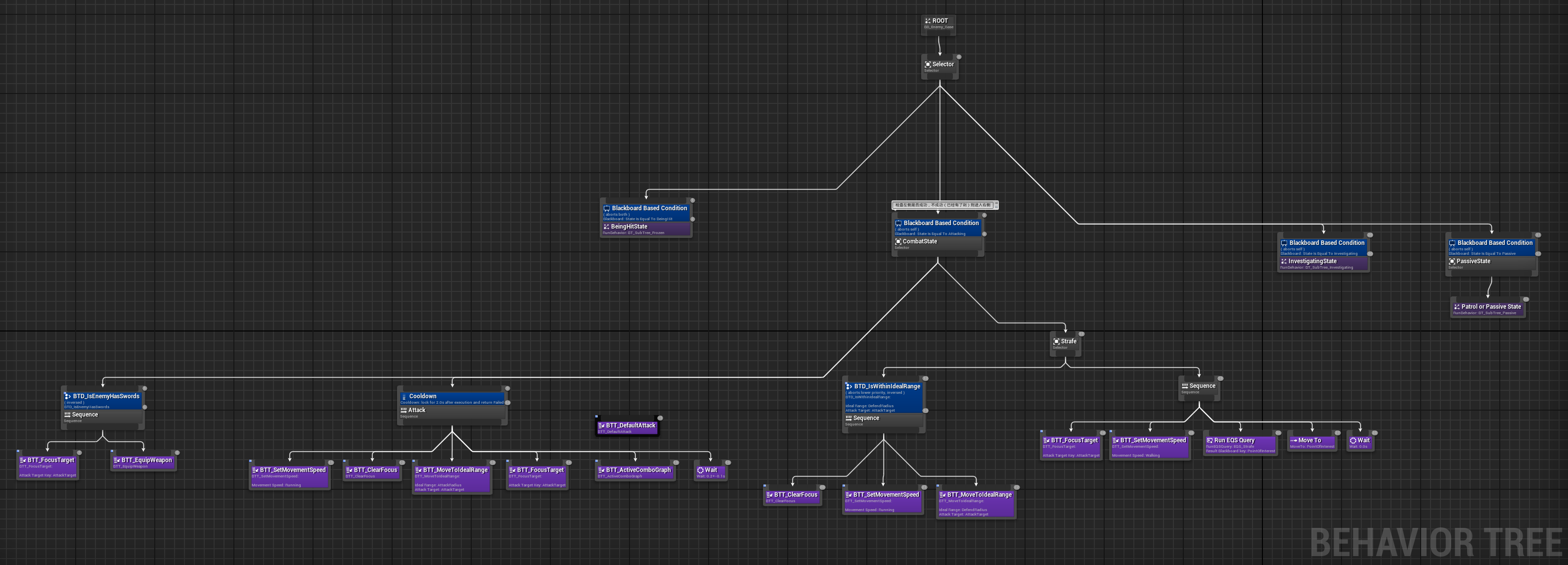
Behavior Tree BT_Enemy_Melee — decision trunk:
BT_Enemy_Melee uses a classic priority architecture with a top-level Selector node. From left to right, or high to low priority, it is divided into four core branches. Each branch uses a Blackboard Decorator to check the value of the State variable and decide whether it should activate:
Root (Selector)├── [1] BeingHit State ← State == BeingHit → SubTree_Frozen├── [2] Combat State ← State == Attacking → combat logic sequence├── [3] Investigating State ← State == Investigating → SubTree_Investigating└── [4] Passive State ← State == Passive → SubTree_PassiveThis priority design ensures that hit reaction has the highest response priority and interrupts all behavior. Combat logic comes next, investigation after that, and patrol is the lowest-priority default behavior.
[1] BeingHit
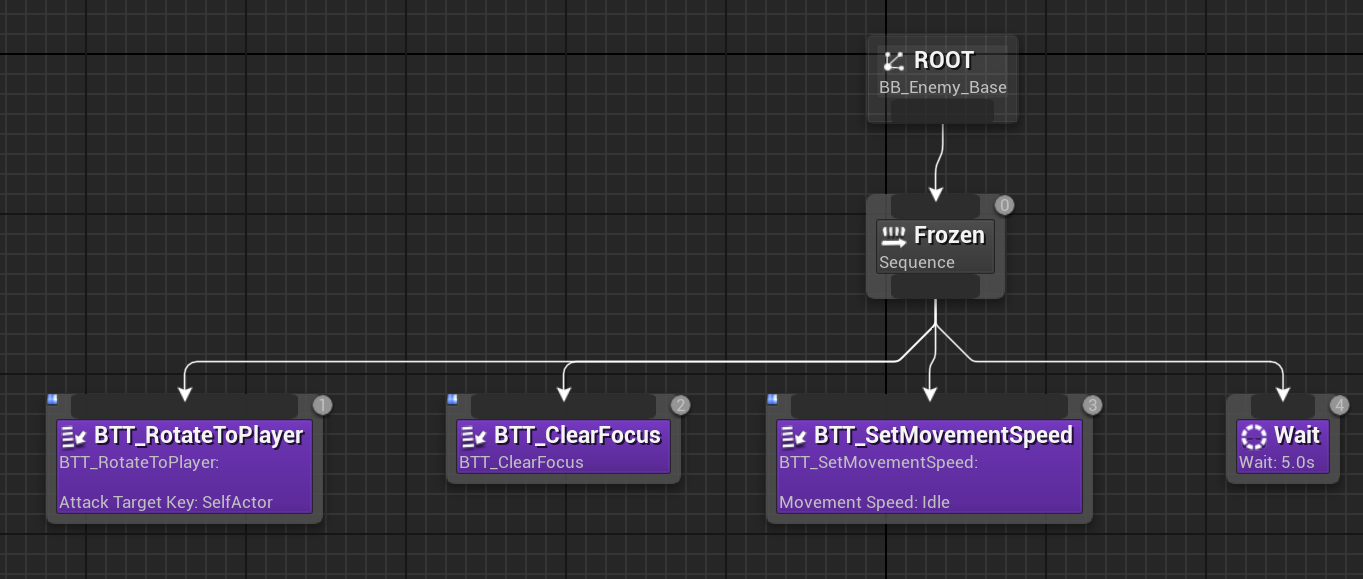
Section titled “[1] BeingHit”When the enemy is hit, GAS grants the Event.Character.BeingHit.Melee Tag through GE_HitReaction_Melee. The perception layer switches State to BeingHit, and the Behavior Tree immediately enters this branch.
SubTree_Frozen internal flow:
| Step | Task | Purpose |
|---|---|---|
| 1 | BTT_RotateToPlayer | Forces the enemy to face the player at the hit moment, ensuring consistent hit direction. |
| 2 | BTT_ClearFocus | Clears Focus to avoid unnatural head tracking during stun. |
| 3 | BTT_SetMovementSpeed(Idle) | Sets movement speed to 0 to prevent sliding during hit stun. |
| 4 | Wait | Waits for hit-stun recovery, matching the hit reaction animation duration. |
After the wait finishes, State is set back to Attacking, forming the full loop: hit → stun → combat recovery.
[2] Combat
Section titled “[2] Combat”This is the most complex branch in the entire Behavior Tree and is divided into three sub-stages:
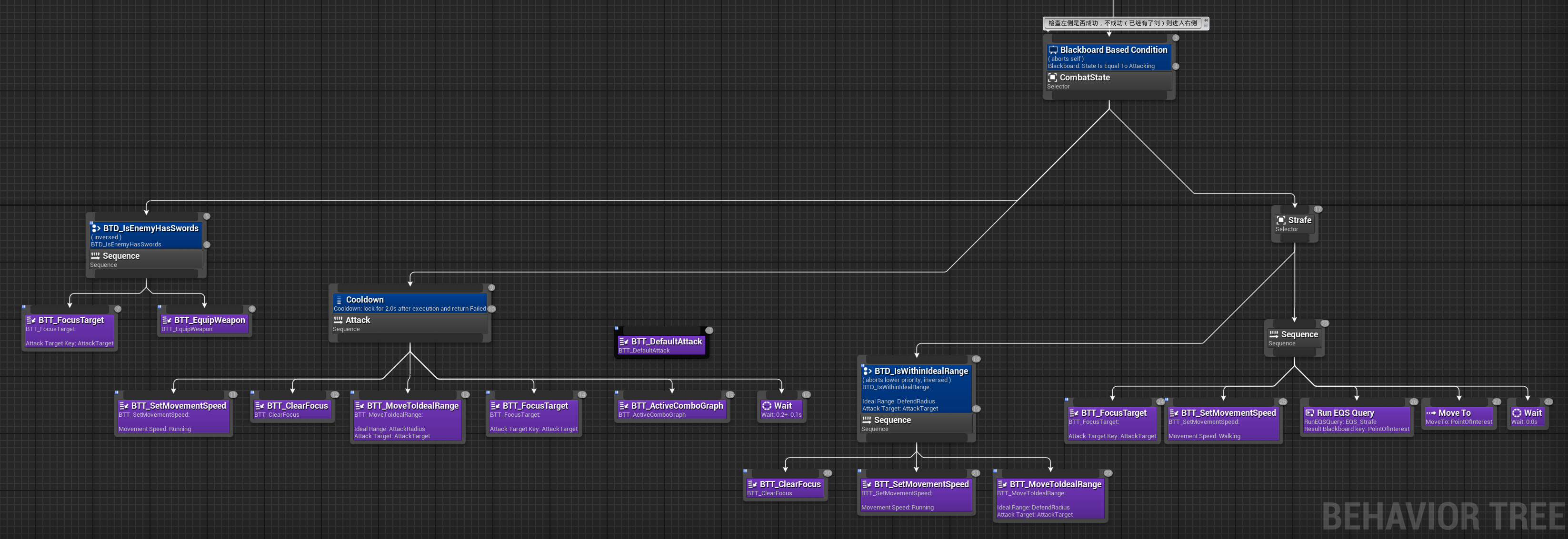
Stage A — equipment check: BTD_IsEnemyHasSwords checks whether weapons are equipped. If not, BTT_FocusTarget → BTT_EquipWeapon runs, drawing the weapons. This is triggered only the first time the enemy enters combat.
Stage B — attack execution (Sequence):
| Step | Task | Purpose |
|---|---|---|
| 1 | BTT_SetMovementSpeed(Run) | Runs toward the target. |
| 2 | BTT_ClearFocus | Temporarily clears Focus to avoid unnatural locked movement while running. |
| 3 | BTT_MoveToIdealRange | Moves to the ideal attack distance defined by DefendRadius. |
| 4 | BTT_FocusTarget | Locks onto the player again. |
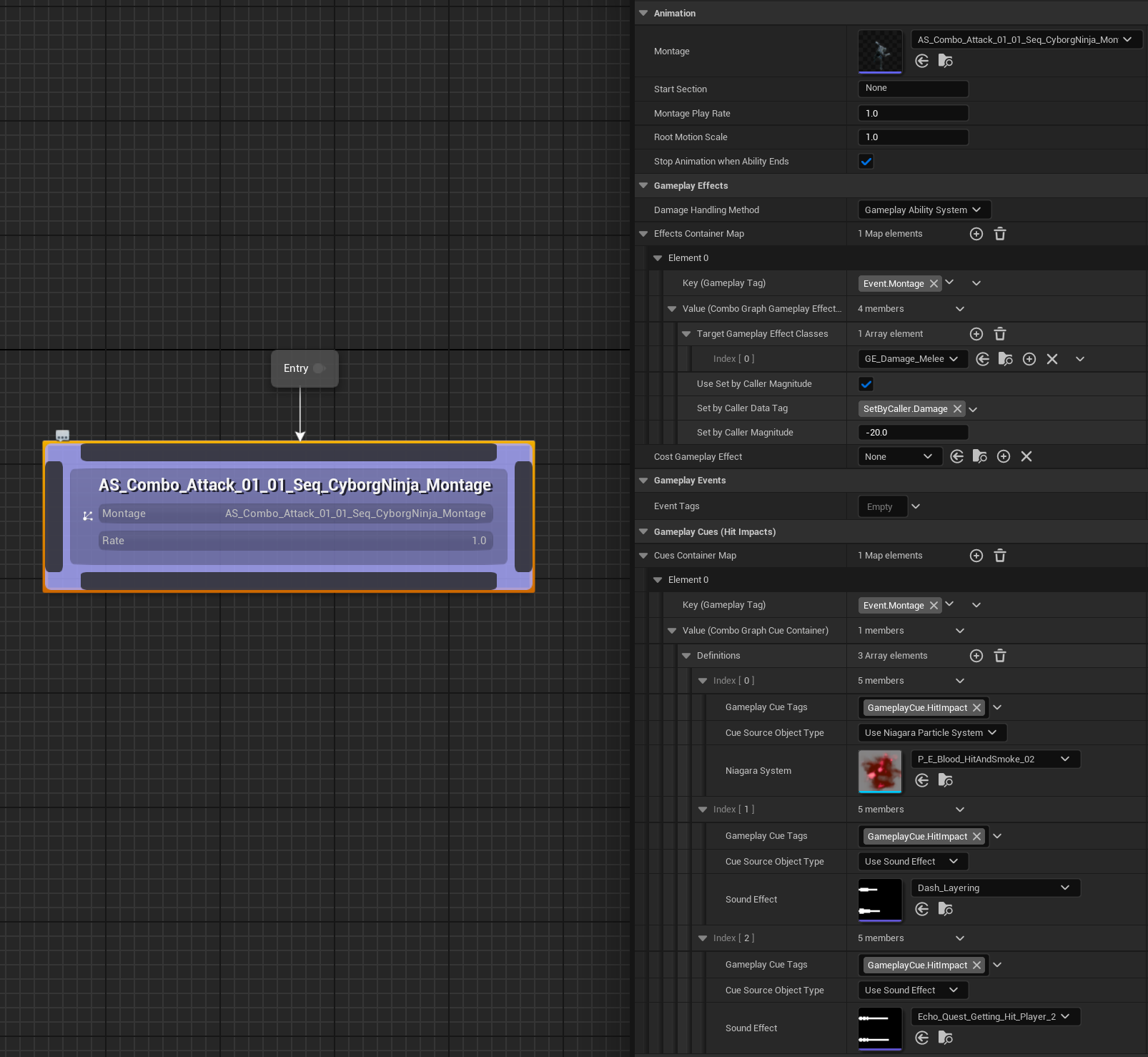
| 5 | BTT_ActiveComboGraph | Activates CG_Enemy_Combo through the BPI_EnemyAI interface. |
Stage C — tactical movement (Strafe Selector):
| Condition | Behavior |
|---|---|
| Outside ideal range | ClearFocus → SetSpeed(Run) → MoveToIdealRange, approaching again |
| Within ideal range | FocusTarget → SetSpeed(Walk) → EQS_Strafe query → Move to PointOfInterest, strafing around the player |
[3] Investigating
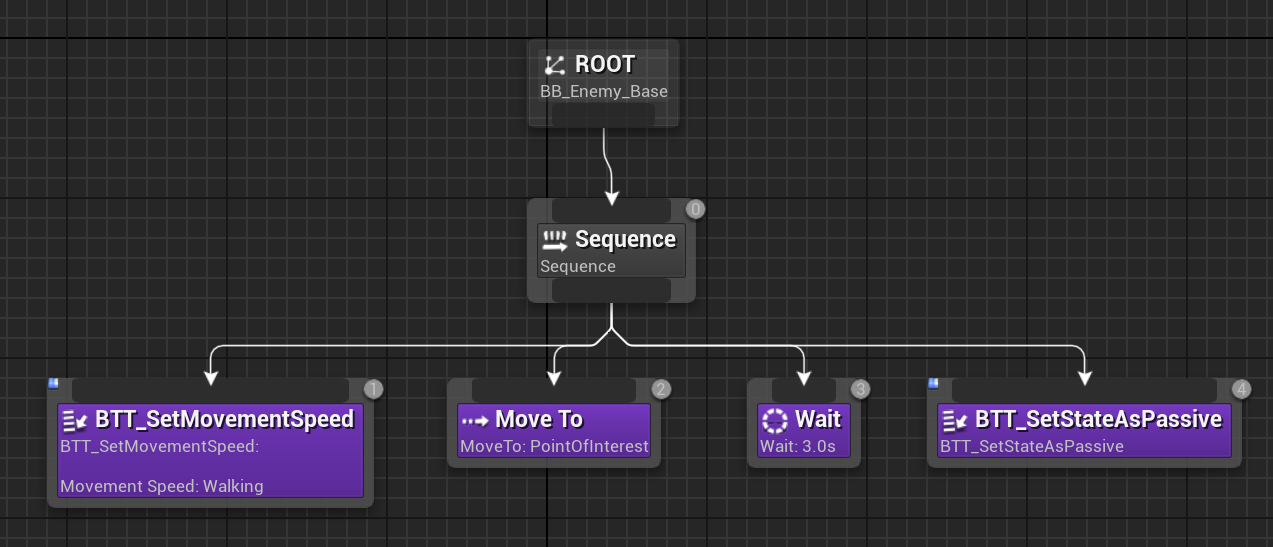
Section titled “[3] Investigating”The enemy enters this state when AI Hearing detects a sound but the enemy has not seen the player.
- Move to PointOfInterest — moves to the world-space sound source.
- Wait — waits in place after arrival, simulating searching and looking around.
- BTT_SetStateAsPassive — if no new perception event occurs, sets
Stateback toPassiveand resumes patrol.
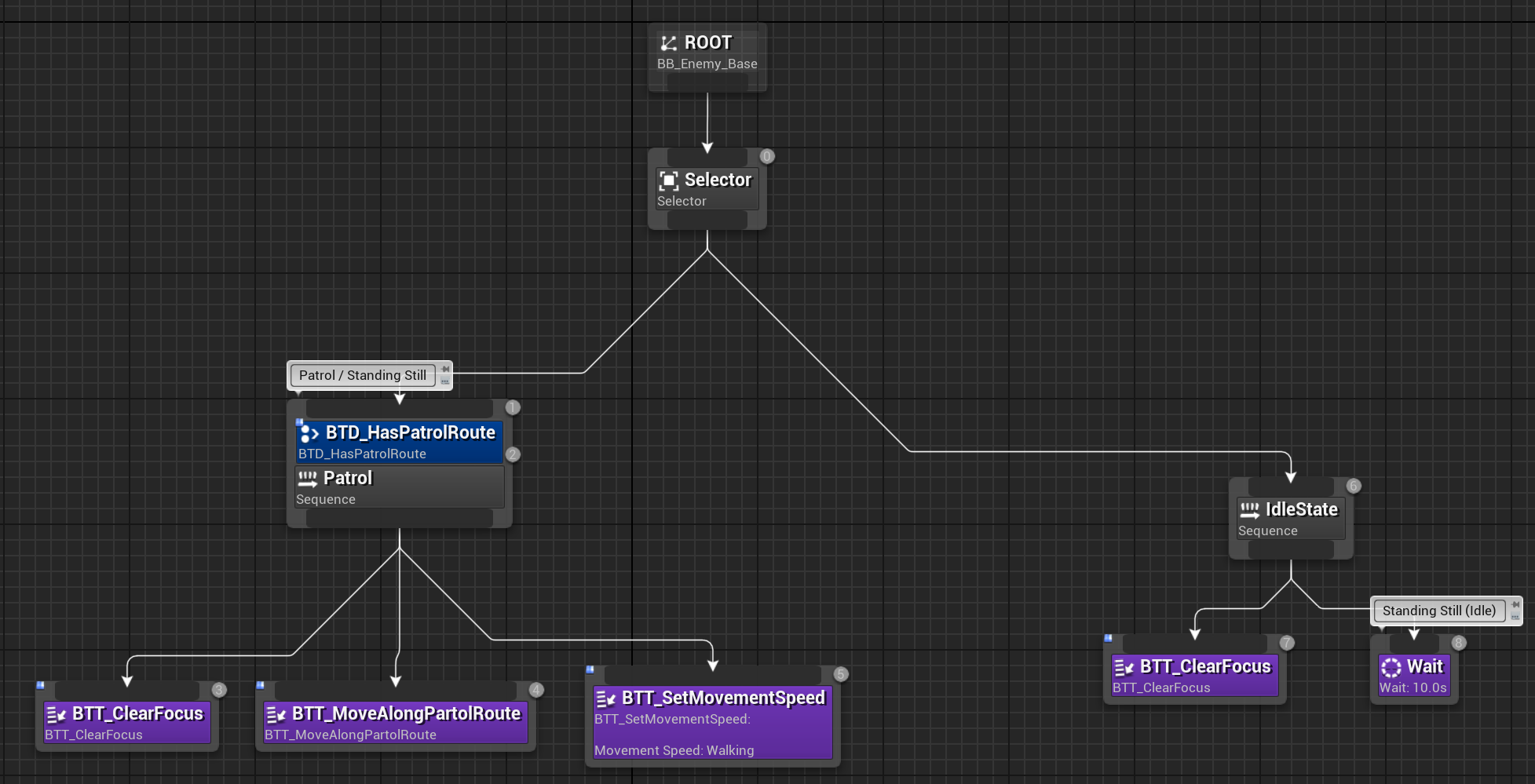
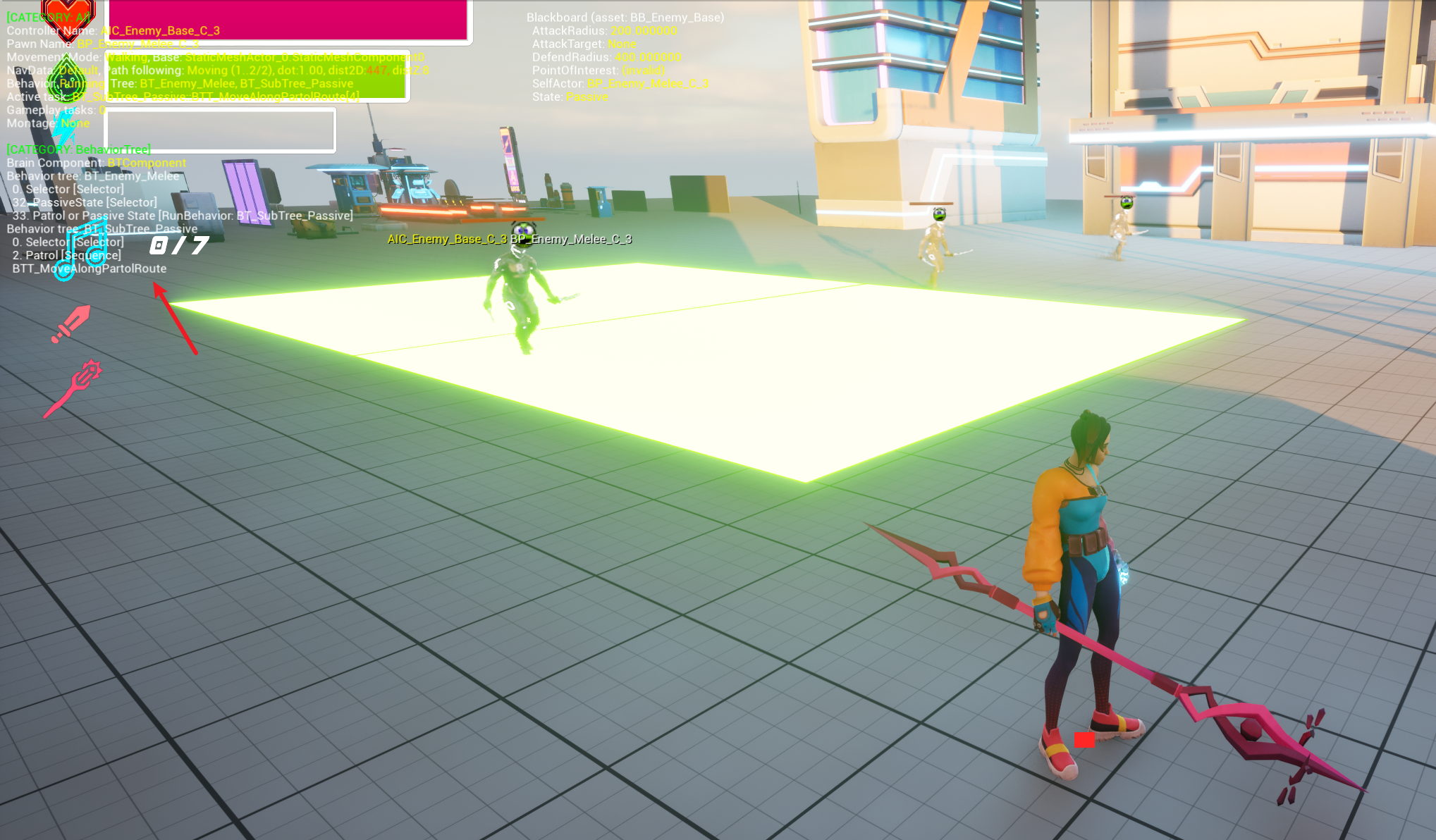
[4] Passive
Section titled “[4] Passive”This is the enemy’s default idle behavior.
The BTD_HasPatrolRoute Decorator checks whether PatrolRoute is valid:
| Result | Behavior |
|---|---|
| Patrol route exists | BTT_MoveAlongPatrolRoute — loops along the Spline path in BP_PatrolRoute |
| No patrol route | Idles in place, acting as a stationary guard |
BP_PatrolRoute defines a path by placing Spline points in the level and supports binding different routes to different enemies.
6.2.4 Execution Layer: Task Nodes and Condition Checks (BTT & BTD)
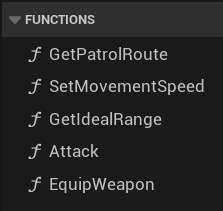
Section titled “6.2.4 Execution Layer: Task Nodes and Condition Checks (BTT & BTD)”The leaf nodes of the Behavior Tree consist of custom BTTasks and BTDecorators. They are the atomic operations of the AI system. Each node does one thing, and complex behavior is built by composing them.
Custom BTTask list:
| Task Node | Responsibility | Key Implementation |
|---|---|---|
| BTT_FocusTarget | Locks focus target | Calls the AI Controller’s Set Focus so the enemy keeps facing AttackTarget. |
| BTT_ClearFocus | Clears focus lock | Calls Clear Focus to release forced head/body tracking. |
| BTT_SetMovementSpeed | Sets movement speed | Sets E_MovementSpeed (Idle / Walk / Run) through the BPI_EnemyAI interface. |
| BTT_MoveToIdealRange | Moves to ideal range | Uses Move To to approach AttackTarget and completes when reaching DefendRadius. |
| BTT_EquipWeapon | Equips weapons | Triggers the weapon-draw montage through BPI_EnemyAI and switches weapons from the back Socket to the hand Socket. |
| BTT_RotateToPlayer | Rotates toward player | Forcibly rotates the Pawn toward AttackTarget for directional correction at the hit moment. |
| BTT_ActiveComboGraph | Activates attack combo | Activates CG_Enemy_Combo through BPI_EnemyAI, executing attack animation and GAS damage logic. |
| BTT_MoveAlongPatrolRoute | Patrols along route | Reads route points from PatrolRoute, moves through them in sequence, and loops. |
| BTT_SetStateAsPassive | Resets to passive state | Sets Blackboard State to Passive, used for returning to patrol after investigation timeout. |
| BTT_DefaultAttack | Default attack fallback | Simplified attack logic used as a fallback when ComboGraph is unavailable. |
Custom BTDecorator list:
| Decorator Node | Responsibility | Evaluation Logic |
|---|---|---|
| BTD_HasPatrolRoute | Whether a patrol route exists | Checks whether the Blackboard PatrolRoute variable is valid, meaning non-null. |
| BTD_IsEnemyHasSwords | Whether weapons are equipped | Queries the enemy’s weapon attachment state through BPI_EnemyAI. |
| BTD_IsWithinIdealRange | Whether inside ideal attack range | Calculates the distance between the enemy and AttackTarget, then compares it with Blackboard DefendRadius. |

6.3 Spatial Intelligence: Principles and Practice of Environment Query System (EQS)
Section titled “6.3 Spatial Intelligence: Principles and Practice of Environment Query System (EQS)”6.3.1 What Is EQS?
Section titled “6.3.1 What Is EQS?”The Environment Query System (EQS) is a spatial reasoning tool provided by Unreal Engine. It allows AI to generate a set of candidate locations in the world, score and sort them through configurable Tests, and finally select the optimal location for the Behavior Tree to use.
In this project, EQS is mainly used to solve tactical movement for enemies. After an attack, the enemy needs to choose a reasonable position for strafing or repositioning instead of standing still and waiting for the next attack.
6.3.2 EQS_Strafe Implementation
Section titled “6.3.2 EQS_Strafe Implementation”Query context — EQS_Context_AttackTarget:
Before executing an EQS query, a reference point for the query must be defined. EQS_Context_AttackTarget is a custom EQS Context. It reads the AttackTarget variable, namely the player, from the Behavior Tree’s Blackboard and uses the player’s world coordinates as the generator’s center reference point.
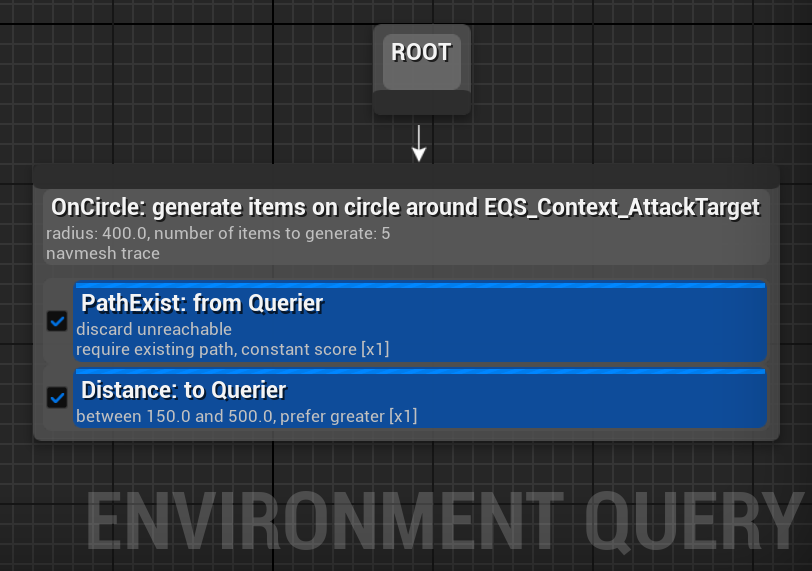
Generator — Points: Circle:
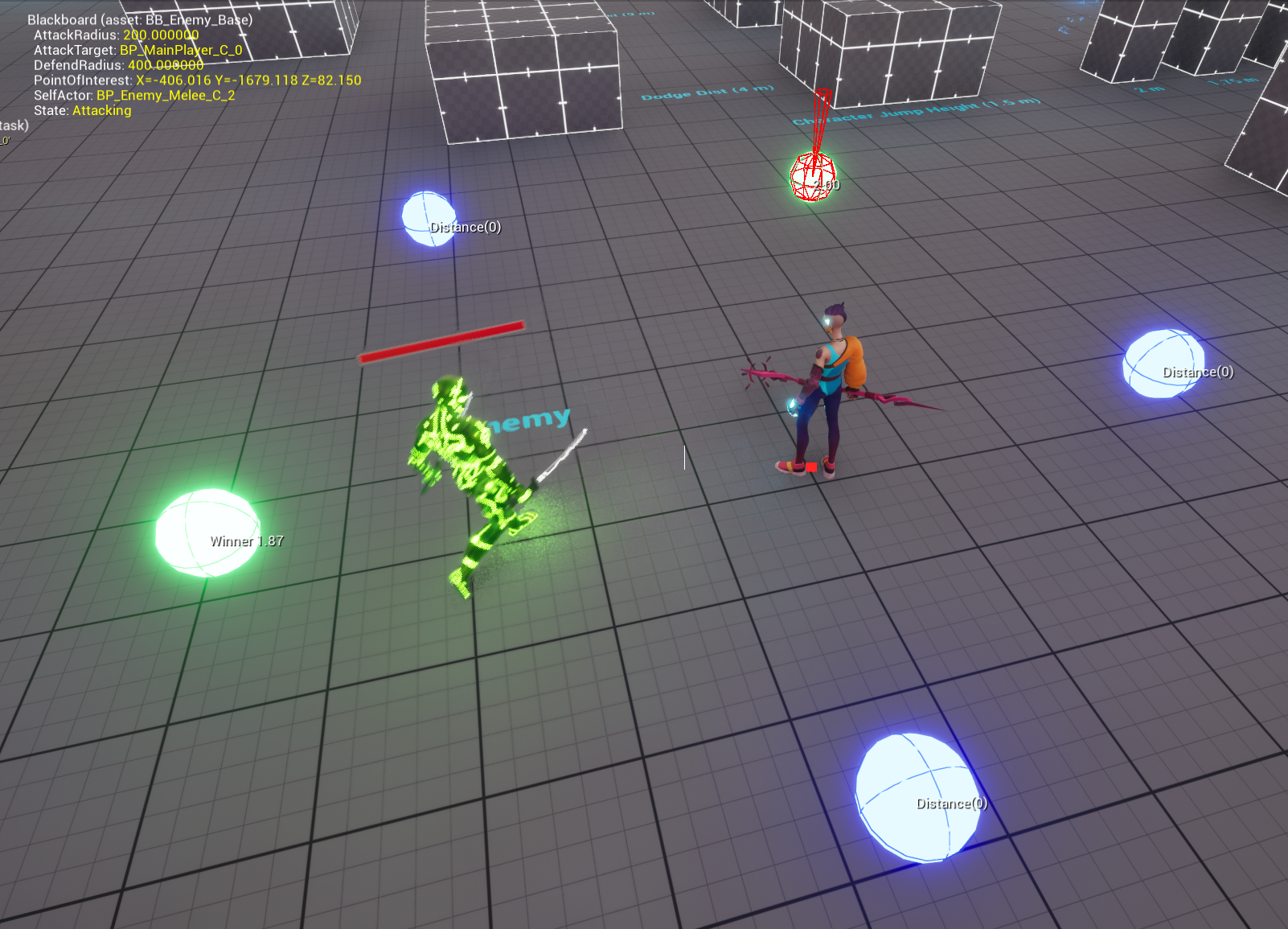
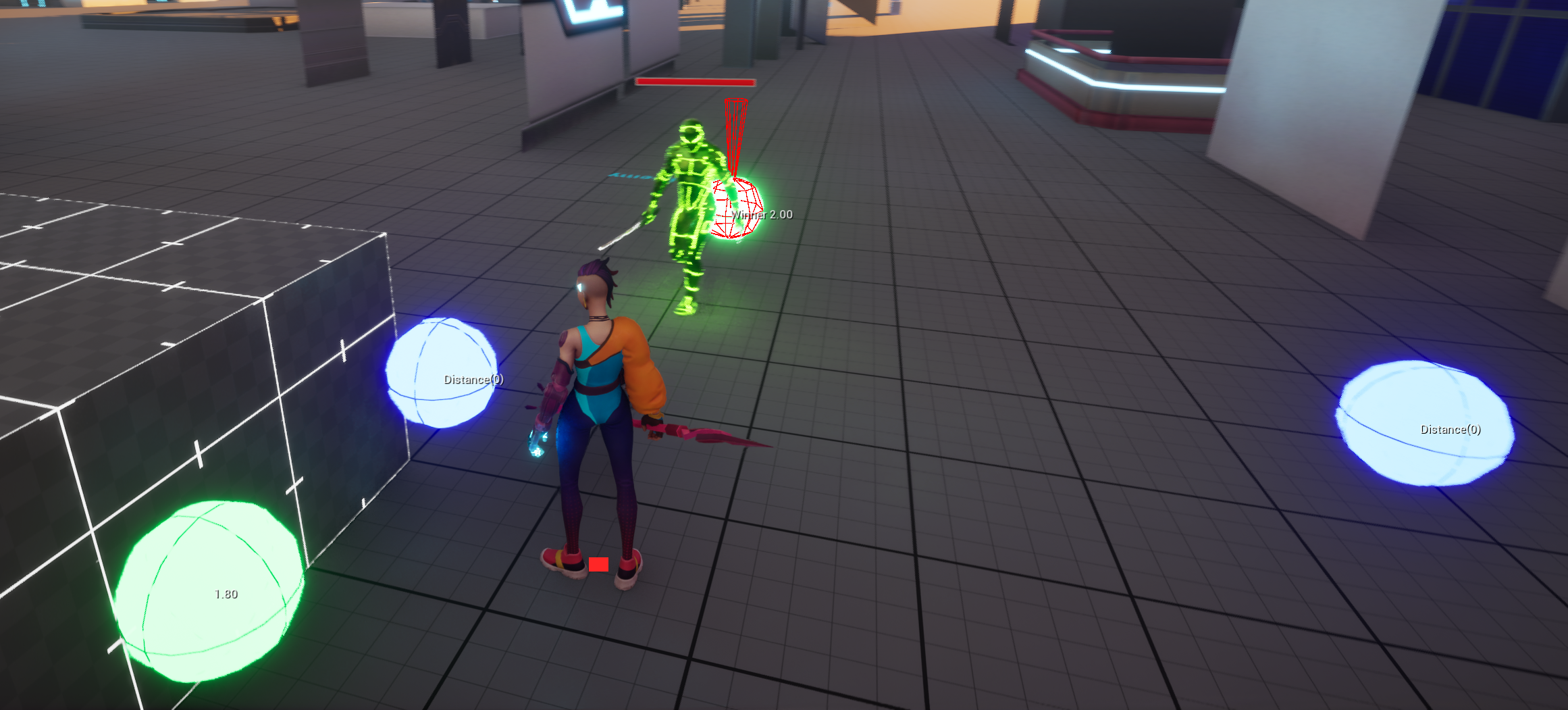
EQS_Strafe uses the Points: Circle generator. Centered on EQS_Context_AttackTarget, the player position, it uniformly generates 5 candidate locations on a circle with radius 400. These points represent possible tactical movement destinations for the enemy.
The reason for choosing a circular generator rather than a grid generator is that melee tactical movement is essentially arc movement around the player. Circular points naturally fit this motion pattern, and only five points are enough to cover the main directions around the player while keeping query cost very low.
Test configuration:
After the generator produces candidate points, the following two Tests score and filter them:
-
Distance Test: evaluates the distance between each candidate point and the Querier, namely the enemy itself. The filter range is configured as 150 ~ 500. Points that are too close (
< 150) or too far (> 500) are discarded directly. This ensures the enemy does not move too close to the player, where it would be easily covered by combos, or too far away, which would break combat pacing. -
Path Exists Test: performs navigation path validation from the Querier to the candidate point. All points unreachable through NavMesh, such as positions blocked by walls or obstacles, are discarded. This is a hard filter condition that prevents the enemy from trying to move to physically unreachable locations and getting stuck on obstacles.
Using the query result:
The best location returned by the EQS query is written into the Blackboard variable PointOfInterest. Then the Strafe branch inside the Combat State of the Behavior Tree executes Move to PointOfInterest, driving the enemy to move to that point. The full flow forms a tactical loop: attack → EQS query for optimal strafe point → move to strafe point → re-evaluate distance → attack again.
6.3.3 Design Considerations for EQS in This Project
Section titled “6.3.3 Design Considerations for EQS in This Project”Why not move randomly?
Simple random movement creates two problems: the enemy may move behind a wall or into an unreachable area and get stuck, or it may move too far from the player and break combat rhythm. With the combined constraints of Distance Test and Path Exists Test, EQS ensures that tactical movement points remain within a reasonable combat range and are physically reachable.
Why use only 5 points?
EQS queries have performance cost. The more candidate points there are, the higher the per-query test cost. For melee enemy strafing, five evenly spaced circular points are sufficient to cover the front, back, left, right, and rear-side directions around the player. This keeps query cost low while preserving tactical variety.
Future extensions:
- Dot Product Test (direction preference): add a dot product test against the enemy facing direction, making enemies prefer side or rear positions and simulating flanking behavior.
- Multi-enemy coordination: when multiple enemies exist in the scene, add a Distance to Other Queriers test so enemies keep distance from one another, avoid clustering at the same position, and establish basic group-AI spacing.